The short version
Your computer probably feels like it is running slow for one of the following three reasons.
The first reason is that your computer might be trying to do too much at the same time. Even though you may not think you have asked it to do many things, this may still be the case. Many things you’ll commonly do on your computer, like moving your mouse around or opening your web browser, often take many discrete steps and calculations to get to what you would consider complete. How this can slow down your computer and why older computers feel like they get slower will be explained later in this post.
The second reason is that your computer may not be able to get the information it needs fast enough. Often, this means that your connection to the internet, through your internet service provider, is slow. Another less common way that this occurs is if the hardware of your computer isn’t able to communicate at the necessary speeds. Buffering when you try streaming videos from Netflix or YouTube is a common manifestation of this kind of computer slowdown.
And, the third reason your computer might feel slow is due to your experiencing something called packet loss. With packet loss, information going to and from your computer gets lost and never makes it to its destination. This is most commonly noticed by multiplayer video game players in the form of lag or de-sync, but can also influence the load times of things like videos and even web pages.
Now, for the long version (with explanations).
Justification
By the end of this post, you will have a broad understanding of the three primary reasons why computers run slowly. In short, these three reasons are as follows:
- There is a limited number of things that your computer can do at the same time.
- There is a maximum speed that your computer can get access to new information.
- Information is being lost going to and from your computer
Of the reasons above, the first is more often the reason why people perceive of their computer as slow. Below, I will further explain the above reasons about why your computer is slowing down by comparing your computer to a hot water heater. Trust me, it will make sense.
Background Knowledge
First, a quick explanation for how a hot water heater works (at least the one I’ll be using to explain my point here). The hot water heater takes in cold water, heats it up over a period of time, and then sends the hot water off to wherever it needs to go. Something unique to note about our hot water heater is that it won’t send out water unless it is of the desired temperature.
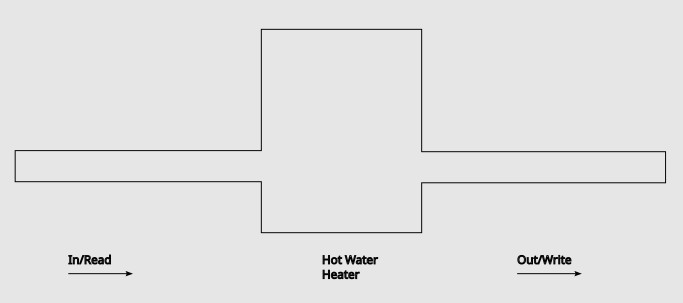
Now, to start drawing parallels between the hot water heater and a computer. The computer equivalent of taking in cold water is called reading. Reading can be used to refer to any time the computer takes in information. This information can take many forms. The keystrokes from your keyboard get read to the computer. The computer reads information off of your hard drive when you try opening a word document. Your computer even reads in information from the internet when you try and stream videos.
The computer equivalent of heating up the water is called executing. Executing occurs when the computer takes the information that it has read in and then changes it in some way so that it can be used elsewhere. In hot water heater terms, your computer is turning cold water into hot water. Something that most people intrinsically recognize as the computer performing an execution is asking a computer to do math. You read numbers in from somewhere and then ask the computer to calculate the result. However, executing isn’t limited to adding two numbers together. In fact, executing is a critical step that your computer has to undertake for every action you do. After typing a key, the computer executes an operation that changes that button press into a signal that can be displayed on your monitor in the form of the letter you typed. When loading information off your hard drive, in much the same way as a keystroke, that information needs to get converted into a form that can then be displayed on screen. The same goes for videos that you’re streaming; signals being sent over the wire need to be converted to flashing lights. Not all executing involves information being displayed on the screen. If you’re trying to download a video on to your computer, the information that you are reading from the internet needs to be processed (through execution) into a form that can be stored on your hard drive. Similarly, if you’re recording a video through your webcam, the information that the webcam is taking in needs to be converted into a format that can go into storage (or displayed if that’s what you’re trying to do). The most important fact to keep in mind about executing is that it will often take the longest time to complete. This is the case because there are many steps that need to occur for an execution to complete (especially at the really high level we’re talking about them).
The final task that the hot water heater needs to complete is to send out the properly heated water. In a computer, the act of sending out the result of the execution is called writing. Now that the computer has the information processed into the correct form, it now needs to write it to its appropriate destination. When the computer is done with its executions for typing it needs to write that information to the display so that it actually gets shown. Similarly, when you’re downloading a video, now that video is now in a form your computer can store, it needs to be written to a hard drive so that it can be accessed later when you want to watch it.
After that video has been written to the hard drive, you can come back to it later to try and watch it, and then cycle of reading -> compute -> write starts again. Every process on the computer can be broken down into these steps. This is very high level abstraction for describing how a computer works (and therefore leaves out a lot of information), however, it provides a very convenient way to answer our main question, “why is my computer so slow?”
You can only heat up so much water at a time (Computers can only do so much)
Our hot water heater is of a finite size, so we can only heat up as much water as we can fit inside of the tank at the same time. If the heater can heat up the water and send it out fast enough to keep up with the demand for hot water, then there isn’t an issue. The problems start when the demand for hot water increases beyond what the heater can supply. As a reminder, our hot water heater doesn’t send out any water until it is at the desired temperature. Therefore, if we can generate enough water of the desired temperature fast enough, that means we can’t supply water to everyone that wants it. The water just isn’t heating up fast enough to keep up. As a side effect, the water tank slowly fills up. This continues until the tank is at max capacity, at which point no more water can even enter the tank until some of the water already in there gets emptied out by reaching the desired temperature and leaving.
While a little contrived, this is basically what happens on a computer that cannot keep up with the demand for executing being placed on it. At a certain point, the computer’s capacity for executing is maxed out and our “tank” is full. In fact, the things you associate with your computer being slow, like your mouse jumping around the screen or what you’ve been typing appearing in short bursts is directly caused by this. In keeping with the above analogy, this is the equivalent of some of the water leaving because it has reached the right temperature (and also allowing for more executing to occur).
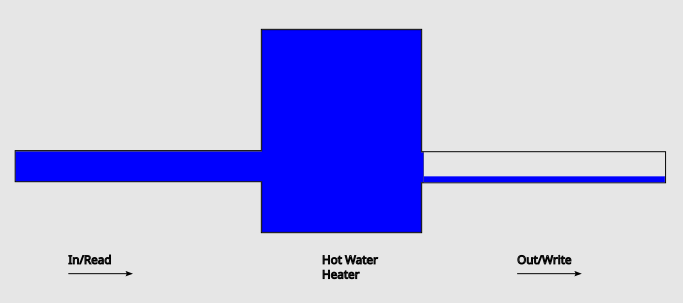
To explain how the computer gets into this state, the water heater analogy breaks apart a little. The part about the computer that doesn’t quite work with the analogy is the fact that multiple applications want to do different calculations/executions at the same time. The closest equivalent that I could think of that would be if our water heater could heat water up to different temperatures depending on what every different person in the house wanted for their bath, but our heater has already strayed far enough from reality. To stick with the computer version of these events, let’s analyze the following example. Google Chrome wants to stay open and do what it needs to do to allow you to browse the internet. Each tab in Google Chrome wants to read in from the internet, execute that information into a web page, and then write it to your screen. All this happens while, at the same time, your keyboard and mouse want to have their inputs read in, executed, and written to the screen as well. Now lets say you open up Microsoft Word to take some notes while you browse and you open Spotify to play some music. All of these events start their own version of read, execute, write and if your computer can’t execute fast enough things start to freeze and stutter (hitting your computer on its side will not fix this).
Alternatively, sometimes your computer is just slow because the executions it needs to do take a long time or there is a lot of them. A human equivalent for this is adding number together. Two digit numbers might not take us so long, but 10 digit numbers take significantly longer. The same idea holds for word documents. If the file is bigger your computer needs to make more of those smaller executions to show the words on the screen. This rolls up into a large execution (namely opening the large file) that can take a long time.
How to fix this version of a slow computer (How can I heat up more water)
To stop your computer from slowing down this way, you could look at getting a faster computer. I know this isn’t exactly helpful for most, but there is a limit to what a given computer can do, and if you want your computer to do more you may need to look into a computer that is capable of it. The idea behind a faster computer is that, if you can execute fast enough, your “tank” never fills up.
Another alternative is to look for a computer that has a larger capacity for executions. Metaphorically, this meand having a bigger “tank”. By having a larger capacity for executions, it allows your computer to do more things at the same time. This allows longer executions to occur while still also having capacity for the smaller executions, like moving your mouse, to occur at the same time. This won’t make the executions happen any faster, but it will stop your computer from freezing since there isn’t this backup of water not being able to enter the tank because the tank is full.
You could also look into lite versions of applications that require less and smaller executions. However, in these lite applications you can miss out on features found in the main applications, so this may not be helpful advice either.
These solutions alleviate what people most commonly perceive as a slow computer since the computer won’t get overwhelmed so easily.
You can only move so much water around
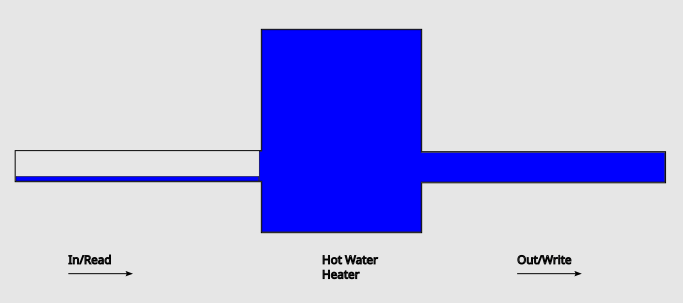
Going in to this section, let’s assume that the hot water heater heats up the water to the desired temperature instantly. The point of this assumption is so that we can focus on a different factor that might be slowing down your computer. In this case, the bottleneck is going to be how fast we can bring the water to the heater and then how fast we can distribute the water after it gets heated. With this assumption in mind, we can further break down the problem into two aspects. The first aspect is that the water isn’t arriving at the heater fast enough. The second aspect is that the water can’t be distributed fast enough, which causes it to get stuck inside of the heater.
With this in mind, let’s address the first potential problem, the water isn’t arriving fast enough. In computer terms, this means that you aren’t reading enough information to keep up with what you are trying to accomplish. If your goal is to stream a video smoothly, this means that you aren’t getting enough frames fast enough. To combat not getting the frames fast enough, your computer starts to buffer the video. By buffering, your computer is waiting to read in enough frames so that it can play a small portion of the video seamlessly, instead of whatever rate the frames are arriving at. However, once that group of read in frames is played out, your computer has to buffer again. Your computer could technically play the video if it had it, but since it is stuck waiting to read the information your computer seems slow.

On the other hand, you can have a case where the water isn’t being taken from the hot water heater fast enough. In computer terms, this means that the computer isn’t writing out the results of the computations fast enough. Since the hot water heater has limited space, it can’t heat up any more water if it is full. So, if you aren’t removing the water fast enough, things can get backed up. The same thing can happen to your computer, making it seem slow. This is the least common of all the cases mentioned in this post, so it’s only really mentioned for the sake of completeness.
How to fix this version of a slow computer (How to move more water around)
To address the problem of a slow computer at this level, you often need to talk with your internet service provider. Computers are usually capable of quite fast reading and writing speeds, and are often limited by whatever plan you have with your provider. When you see mentions of download and upload speeds in marketing material, you can replace read and write with them respectively to fit the information into our model here.
Often, people will notice a larger improvement in speed if they increase the amount of download allowed by their service provider. Activities, such as streaming videos to your devices to watch, are very download intensive. Increasing your download speeds addresses the read side of the problem mentioned above.
If you intend to talk with friends over services like Discord, play video games that have an online component, or live stream on a service like Twitch, your upload speed is as critical as your download speed. To stick with the terminology we used above, you now need to be allowed to upload (write) the amount of information necessary for those modes of communication. In the example of live streaming, you are doing the opposite of downloading a video for streaming; you are uploading it for everyone else to download. So, if your upload speed isn’t as fast as your download speed, you will notice a slow down here.
The pipes have a leak
The final way (that I’m going to discuss) that can cause your computer to slow down is called packet loss. This cause of computer slow down is sneaky in a way, since it can still cause your computer to feel slow, even if your computer can read, execute, and write at a rate fast enough to keep up with what you are doing. Using the analogy of a water heater, packet loss is the equivalent of having leaky pipes.

To clarify a bit, the pipes technically can bring enough water, the water heater can technically heat that water fast enough, and the heated water can be distributed in a timely manner. However, all of this is a technicality because some of the water is leaking out on its way to and from the hot water heater. To explain this, let’s look at an example with some easy to think about numbers. Let’s say your house needs 30 gallons of water per minute and you have pipes that can transport 40 gallons of water per minute. However, those pipes leak out 1/3 of the water moving through them at any given time. So, if you are moving only the 30 gallons per minute that your house requires, only 20 of those gallons reach your house, making it so you don’t have enough water. Even if you push your pipes to the maximum 40 gallons per minute that they can support, since 1/3 of the water is leaking out, your house only gets 27 gallons per minute. This illustrates what I meant before when I used the word technically. Technically, your pipes can move 40 gallons per minute, however practically, only 27 gallons of those 40 get where you need them. This makes it so you have to spend more time transporting the water, more time heating up that water, and more time delivering that water where it needs to go.
Packet loss is the computer equivalent of leaky pipes, and is typically the result of a bad connection between two devices trying to communicate. The most common cause of packet loss is being connected to your router (your gateway to the Internet) over WiFi. It’s possible that walls or other surfaces can cause the information you’re meant to receive from your router to bounce around unexpectedly and not successfully arrive at their destination (your device). Another factor that can prevent the information from reaching your device is signal interference from other devices. If there are a lot of devices trying to communicate over WiFi or if there are other devices in your house that produce similar signals, the signals to and from your devices can be interfered with causing them to get canceled out or garbled before ever reaching their destination. All of this results in your device having to ask for that the information that it missed get repeated to it again and hopefully get it this time.
Packet loss is particularly noticeable when streaming videos or playing video games. If you experience packet loss while streaming a video, your progress in the video can jump forward even when nothing else appears to be going wrong (since the video frames leaked out of the metaphorical pipes in the first place). With video games, packet loss can get you teleported across the map, make events happen that you didn’t expect, or have your character end up in a place that you didn’t expect. In a common, frustrating example for people that play first person shooters, you can experience packet loss while moving your character around and then, when your computer asks for the information that is missed, you find out that your character actually died through no fault of your own and at a point when you thought you were clearly behind cover. Note, this can happen multiple ways, and this is just one of them.
How to fix this version of a slow computer (Patching the leaks)
The best way to fix the problem of packet loss is to make your connections more reliable. And, the best way to make your connection more reliable is to plug in a networking cable, like an Ethernet cable, from your computer to your router. This essentially sets up a highway for your computer to talk to the router and navigate its way to the internet.
If you cannot plug in a cable due to the location of your computer, you could alternatively get a device called a signal repeater. As the name suggests, a signal repeater repeats all the signals going from your router to your computer and then back again. This prevents signal loss as it makes your connection more reliable. This is especially good if your device is set up far away from your router. To understand why a signal repeater helps, think about someone yelling some instructions at you. If you’re too far away, you either won’t be able to clearly make out what they’re saying or won’t hear them at all. A signal repeater is the equivalent of having a friend in the middle repeating everything being said. This way, once your friend repeats the instructions, you don’t miss any of the original message. To use hot water heater terminology, this means that none of the instructions leak out.
Conclusion
Often, figuring out exactly why your computer is slow is some combination of all of the above reasons, and employing just one of these solutions isn’t enough. However, by taking some of the smaller steps mentioned earlier, it is likely that you can go pretty far in addressing why your computer is running slow all on your own.
With all that said, best of luck getting your computer running faster.
 Numbers All The Way Down
Leave a comment